September 2, 2026
Testsigma and TestInspector are both positioned as no-code test automation platforms, but they differ substantially in how they translate a tester’s intent into executable steps. Testsigma parses natural language sentences through an NLP layer that converts them into actions, which works well for straightforward flows but introduces ambiguity when assertions become conditional or when selectors require multiple fallback strategies. TestInspector takes a different approach: an AI chat interface that generates test steps as structured, discrete units rather than parsed sentences, with each step visible as an explicit action-target-assertion triplet in the run log. Teams switching from Testsigma to TestInspector typically report that the run logs are easier to interpret because every failure maps to a specific step rather than to a parsed sentence that the NLP engine may have interpreted differently than the author intended.
The practical difference matters most during debugging. When a Testsigma test fails, the failure message references the natural language step that failed, but the engineer still needs to determine whether the failure was caused by a selector not finding an element, a timing issue, an assertion mismatch, or a parsing misinterpretation of the original step text. TestInspector’s structured steps separate these concerns at the authoring stage: the action (click, type, assert), the target (the selector), and the expected value are explicit fields, not inferred from prose. A failure in TestInspector points to exactly which of these three components was the source of the failure, without requiring the engineer to reason backward from a natural language description.
QA teams evaluating AI-native no-code tools in 2026 are working through a crowded market where the distinction between “no-code” and “natural language-driven” is meaningful but often obscured in marketing. Astaqc’s test automation services help teams evaluate tools against their actual workflow requirements, and the AI in software testing guide covers the broader landscape of AI-assisted QA in 2026.
Testsigma’s core authoring model is natural language test steps. Testers write steps in plain English, such as “Click on the Login button” or “Verify that the username field displays ‘Please enter a valid email’”, and the Testsigma NLP engine interprets these steps to generate executable Selenium actions. This approach lowers the barrier for non-technical testers who are unfamiliar with locators and DOM structure, but it also introduces a translation layer between the tester’s intent and the executed action. When the NLP engine misinterprets a step—choosing the wrong selector strategy, applying the wrong assertion type, or failing to handle a conditional—the resulting failure is in the generated action, not in the test step text, which means the tester needs to understand how the NLP layer works to debug it effectively.
TestInspector’s authoring model bypasses the NLP translation layer. The AI chat interface accepts natural language descriptions of what to test, but rather than parsing those descriptions into actions at runtime, it generates a structured test plan at authoring time that the tester can review and edit before running. Each step in the generated plan is an explicit action with an explicit target and an explicit expected value. The tester sees exactly what the AI has generated and can modify any field before saving the test. This means the AI is assisting at authoring time, not interpreting at execution time, and the execution layer runs only deterministic, pre-specified steps.
Both platforms support browser recording as an alternative to manual step creation. Testsigma’s recorder captures natural language step descriptions as you interact with the application, while TestInspector’s browser extension records interactions as structured steps directly. The structured recording approach means the recorded test is immediately in the same format as a manually created or AI-generated test, without a parsing step that could introduce ambiguity. For teams that use recording as the primary test creation method, the difference is less pronounced, but for teams that rely on AI-generated test cases for complex flows or API testing, the structured generation approach produces tests that are more directly editable and easier to maintain. TestInspector’s AI-native approach is detailed at astaqc.com/test-inspector.
Testsigma’s execution layer runs tests on its own cloud infrastructure using Selenium WebDriver, with the option to run tests on local machines through a Testsigma agent. The platform supports Chrome, Firefox, Edge, and Safari for web testing, and also supports mobile testing on Android and iOS devices through Appium integration. The natural language steps are compiled to Selenium commands at execution time, which means the compilation step is part of the critical path for every test run. On complex tests with many steps, this compilation overhead can add to run time compared to frameworks that execute pre-compiled actions directly.
TestInspector runs tests via Selenium on Chrome, Firefox, Edge, and Safari, with execution happening against the pre-structured test steps that were generated at authoring time. Because the AI assistance happens at authoring rather than execution, the run-time path is a straightforward Selenium execution with no additional parsing overhead. The platform streams run status over WebSocket, which means the run log updates live during execution rather than appearing as a batch at the end of the run. For teams that monitor test runs interactively—particularly in CI pipelines where a failing test needs to be investigated before the next deployment proceeds—the live streaming reduces the time between test failure and engineering awareness.
Both platforms support visual regression testing. Testsigma captures screenshots at designated steps and compares them against baseline images using pixel-based comparison. TestInspector uses SSIM (Structural Similarity Index Measure) screenshot comparison with baseline approval workflows, crop selectors, and exclusion zones for dynamic content areas. The SSIM-based approach is more robust to acceptable rendering variation than pixel-exact comparison, which means fewer false positive visual failures from anti-aliasing differences, sub-pixel rendering variation, or dynamic content that the tester has marked as excluded. For teams with complex UIs that include charts, animations, or user-generated content, the exclusion zone support in TestInspector’s visual regression approach reduces maintenance overhead significantly.
Variable management differs as well. Testsigma supports test data profiles with parameterized test execution using spreadsheet-style data sets. TestInspector uses a variable interpolation system with a scope hierarchy: variables can be defined at the test level, the suite level, or the organization level, with lower-scope variables overriding higher-scope ones. Special variables include {{TIMESTAMP}} for unique identifiers, {{ALPHANUMERIC}} for random string generation, and {{TOTP:secret}} for time-based one-time password generation, which is particularly valuable for testing 2FA flows without hard-coding credentials. Encrypted storage for sensitive variables means that secrets defined at the organization level are available to all tests in the organization without being visible in test step definitions.
Both Testsigma and TestInspector include self-healing mechanisms to handle UI drift, but they implement them differently. Testsigma uses a self-healing engine that maintains multiple locator strategies for each element and automatically tries fallback locators when the primary locator fails. When healing occurs, Testsigma flags the step and suggests updating the primary locator to the one that succeeded. This approach recovers from many common causes of selector drift—element ID changes, attribute name changes, class name changes—without requiring manual test updates.
TestInspector’s self-healing operates through an AI selector suggestion system. When a step fails because a selector no longer matches an element, the system analyzes the page structure at the time of failure and suggests updated selectors based on the surrounding DOM context. The engineer reviews the suggestions and approves the one that correctly identifies the intended element. This human-in-the-loop approach is slower than fully automatic healing but produces selector updates that are more likely to be semantically correct—the engineer confirms that the suggested selector targets the right element, not just any element that partially matches the failed locator.
The comparison below covers the main dimensions that QA teams evaluate when choosing between Testsigma and TestInspector:
| Dimension | Testsigma | TestInspector |
|---|---|---|
| Test authoring model | Natural language steps parsed by NLP at execution time | AI-generated structured steps reviewed at authoring time |
| Execution run log | Natural language step name + pass/fail status | Structured step details + live WebSocket streaming |
| Self-healing | Automatic multi-locator fallback | AI selector suggestions with human approval |
| Visual regression | Pixel-based screenshot comparison | SSIM comparison with crop and exclusion selectors |
| Variable system | Test data profiles, parameterized spreadsheets | Interpolation with {{TOTP}}, {{TIMESTAMP}}, encrypted org-level secrets |
| API testing | Supported via REST API test type | HTTP request steps (GET/POST/PUT/PATCH/DELETE) with status and body assertions |
| Accessibility testing | Not natively integrated | axe-core assertions with severity levels |
| Export formats | Selenium Java/Python/JavaScript, TestNG, JUnit | Playwright TypeScript, Selenium IDE (.side), Gherkin |
| CI/CD integration | REST API, native integrations with Jenkins/GitHub Actions | Trigger API, cron/interval scheduling |
| AI code editor integration | Not available | MCP tokens for Claude Code, Cursor, Claude Desktop |
The key structural difference is that Testsigma’s self-healing is optimized for minimal human intervention—tests recover automatically and flag the healed step for later review—while TestInspector’s AI suggestions require active human confirmation before the fix is applied. Teams that prefer fully automated recovery will find Testsigma’s model more convenient; teams that prefer to audit every selector change before it becomes canonical will find TestInspector’s approach more controlled. For applications with complex, dynamic UIs where incorrect selector healing can silently cause tests to target the wrong element, the confirmation step provides meaningful quality assurance on the test suite itself. Astaqc’s software testing services include test suite audits that evaluate selector strategies and self-healing configurations for teams running either platform.
Testsigma integrates with CI/CD pipelines through a REST API and native plugins for Jenkins, GitHub Actions, GitLab CI, and Azure DevOps. Tests can be triggered via API call with environment and test suite configuration passed as parameters, and results are reported back to the CI system through standard webhook or polling mechanisms. The platform also supports scheduled test runs with a time-based trigger model, allowing teams to run smoke tests on a production environment on a recurring schedule independently of deployment pipelines.
TestInspector’s CI/CD integration is API-based: a trigger API call initiates a test run with specified configuration, and the run result is available through the same API or via WebSocket streaming for real-time status. Scheduling supports cron expressions, fixed intervals, and one-time triggers, covering both recurring monitoring use cases and deployment-gated test runs. The MCP token system is a feature with no direct equivalent in Testsigma: tokens allow Claude Code, Cursor, or Claude Desktop to invoke TestInspector runs directly from a development environment, creating a test execution workflow that integrates into the AI-assisted development loop rather than requiring a separate browser tab or CI dashboard.
For multi-tenant teams, TestInspector’s organization structure includes owner, admin, and member roles with permission boundaries at the organization level. Variable scoping means that organization-level variables—including encrypted secrets—are available to all tests in the organization without being visible to individual test authors, which supports secure credential management in teams where multiple members create and edit tests. Testsigma supports role-based access control with project-level permissions, which aligns more closely with teams that organize by project rather than by a single shared test workspace.
TestInspector is the stronger choice when the primary concern is run log interpretability and structured debugging. The combination of pre-structured steps, live WebSocket streaming, and AI selector suggestions in a human-confirmation workflow produces a debugging experience where every failure is attributed to a specific, named step component. Teams that have experienced NLP parsing ambiguity in Testsigma—where a failing step requires understanding how the NLP engine interpreted the step text before the actual cause of the failure can be identified—will find TestInspector’s execution model more directly navigable.
TestInspector is also the better fit for teams that test 2FA flows, time-sensitive sequences, or features that require TOTP code generation. The {{TOTP:secret}} variable provides native one-time password generation without external scripting, and the encrypted variable storage means the TOTP secret is never exposed in test step definitions. Testsigma can handle TOTP testing through custom functions, but it requires additional configuration that TestInspector provides as a built-in variable type.
Testsigma is more appropriate for teams that need mobile native app testing (iOS and Android via Appium) in the same platform as their web testing, or for teams whose testers strongly prefer writing plain-English sentences over reviewing structured step forms. The natural language authoring model has genuine advantages for certain tester profiles, particularly testers who come from a manual testing background and find the structured step format less intuitive than describing what to do in prose. The right choice depends on where the team spends most of its debugging time: teams that debug from run logs will prefer TestInspector; teams that prefer to write test descriptions and accept automatic recovery will prefer Testsigma. Astaqc’s test automation services can help teams evaluate both platforms against a specific application and test suite before committing to either. The manual testing vs. automated testing guide provides context on how the authoring model choice connects to broader QA strategy.
Yes. TestInspector exports tests to Playwright TypeScript, Selenium IDE (.side), and Gherkin format. This means the test logic is not locked into TestInspector’s execution layer: a team that later decides to move to a code-first framework can export its existing tests and use them as a starting point for a Playwright or Selenium test suite. The exported tests represent the current test step structure and will require review and adjustment for any platform-specific behavior, but the export path exists and covers the three most common migration targets. Testsigma similarly exports to Selenium-based code in multiple languages, making migration feasible from both platforms.
TestInspector’s variable interpolation system supports parameterized test execution through variable sets at the suite level. A suite variable can be overridden per run or per trigger API call, allowing the same test to execute against multiple input configurations without creating duplicate test definitions. This covers the most common data-driven use case, though it differs from a dedicated spreadsheet-style test data profile system. Teams with large parameterized data sets spanning dozens of input combinations should evaluate whether the variable scope model meets their specific data-driven requirements before selecting the platform.
Testsigma supports custom function steps where testers can write JavaScript or Java code to handle scenarios that the NLP layer cannot cover with natural language steps. This escape hatch is necessary for flows involving drag-and-drop, canvas interactions, or complex state manipulation that prose descriptions cannot adequately specify. TestInspector handles similar scenarios through HTTP request steps for API-side state manipulation and browser extension recording for interaction capture, but teams with a high proportion of complex UI interactions requiring custom JavaScript should evaluate how much custom function code their test suite would accumulate in either platform.
Significant layout changes typically require selector updates across multiple tests in any no-code platform. TestInspector’s AI selector suggestion system reduces the manual effort by proposing updated selectors based on the current DOM structure at the time of failure, but it does not automatically propagate a single selector update across all tests that reference the same element. Teams maintaining large test suites should plan for periodic selector maintenance when the application undergoes substantial redesigns, regardless of which platform they use. The structured step format makes it straightforward to identify which steps reference the affected element and which selector update applies to them. Astaqc’s manual testing services include post-redesign test suite reviews that help teams identify and update affected selectors efficiently.
Both platforms execute Selenium-based browser tests, and the primary determinant of execution speed is the number of browser steps and the responsiveness of the application under test. Testsigma’s NLP compilation step adds a small overhead per step, but in practice this is rarely the bottleneck compared to browser interaction time. The more meaningful speed difference is in the feedback loop during CI: TestInspector’s live WebSocket streaming means engineers see step-by-step progress in real time, while Testsigma’s reporting typically delivers results in batch at the end of a run. For teams where the time from failure to engineering awareness is a key metric, the streaming model reduces the lag even when total run time is comparable. Read more about what software testing is and how platform selection fits into a broader test strategy.
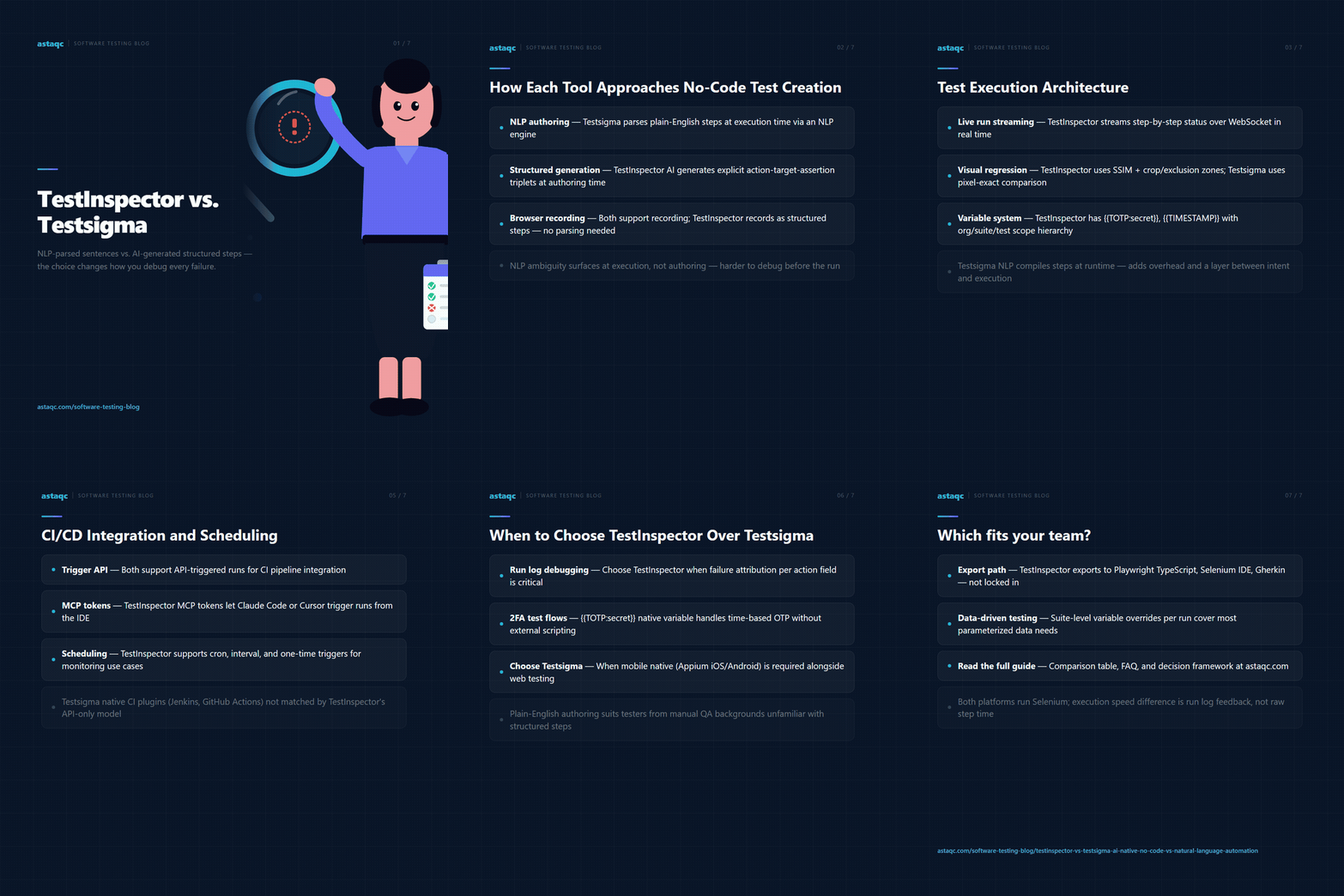
The difference between natural language step parsing and AI-generated structured steps shows up most clearly in the run log: one maps a failure to a parsed sentence, the other maps it to a specific action, target, and assertion field.
September 2, 2026


Sign up to receive and connect to our newsletter

We founded ASTAQC as a tight-knit group of professional Software Testers and software developers.
Subscribe to our Newsletter