August 17, 2026
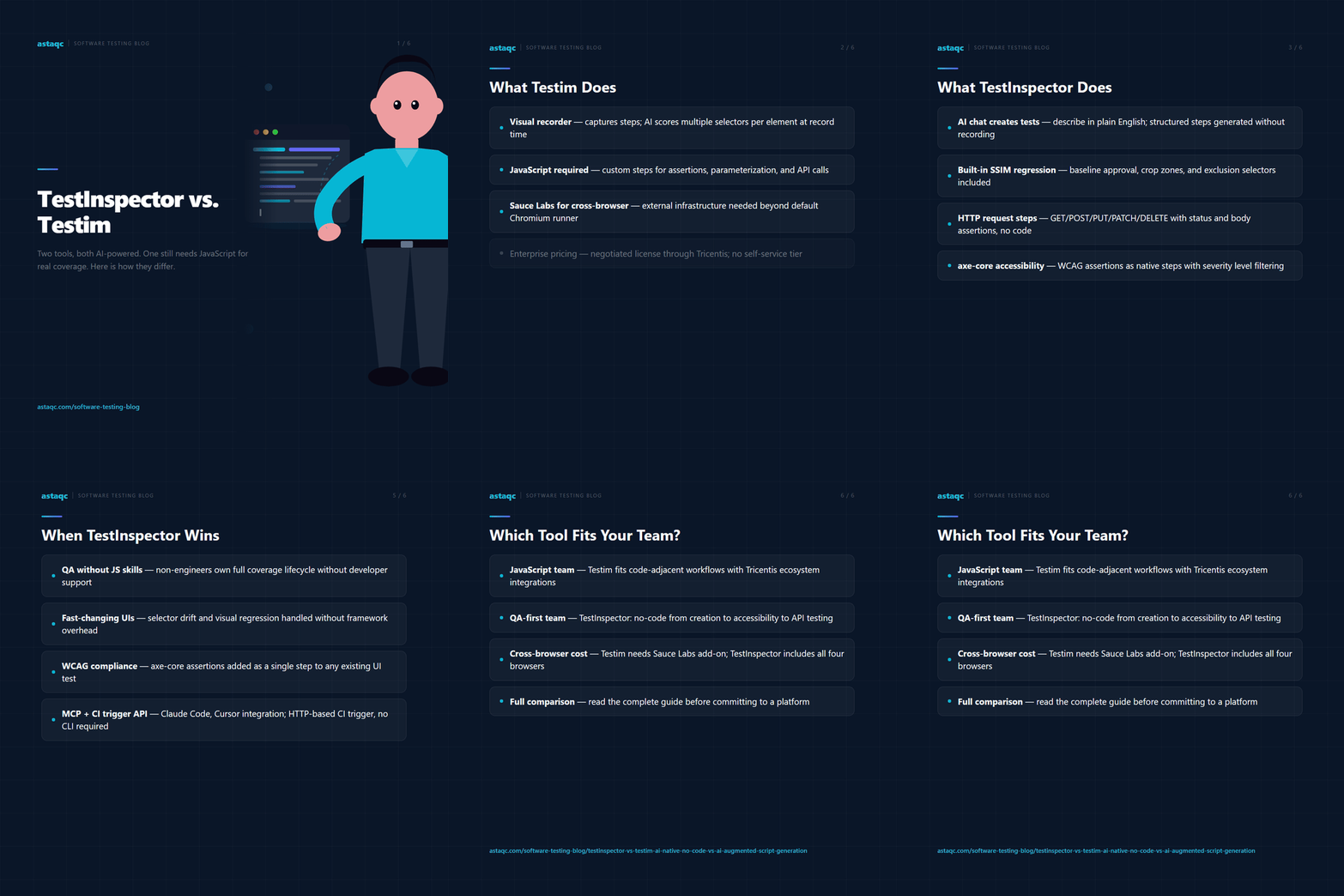
TestInspector and Testim both use AI to reduce the manual effort required to create and maintain automated tests, but they apply that AI at different layers. Testim uses AI models to stabilize element selectors inside a script-based test framework, while TestInspector replaces scripts entirely with structured natural-language test steps generated through an AI chat interface. For QA teams in 2026, the decision turns on whether AI assistance within a code-adjacent framework is sufficient, or whether a fully no-code AI-native approach is required for the team’s skill level and velocity targets.
This comparison covers how each tool generates tests, how each handles selector failures and UI changes, what CI/CD integration looks like in practice, and which team profiles each tool suits best. Teams looking for a broader view of how to evaluate test automation tools in 2026 can use the manual vs. automated testing guide as context. Teams that want external help deciding which tool fits their current infrastructure can speak with Astaqc’s test automation team.
Testim is a commercial test automation platform acquired by Tricentis in 2022. It provides a visual, record-based interface for creating test steps and uses machine learning models to generate element selectors intended to survive UI changes more reliably than manually authored XPath or CSS selectors. Tests are stored as structured step data that maps to DOM interactions, and Testim provides a runner that executes those steps against Chromium-based browsers.
The AI in Testim operates primarily at the selector layer. When a test is recorded, Testim captures multiple selector strategies per element and uses a scoring model to choose the most stable selector at execution time. When the primary selector fails after a UI change, Testim attempts to recover using its alternative selectors before marking the step as failed. This reduces the rate at which recorded tests break after minor UI modifications, compared to frameworks where a single hardcoded selector is the only fallback.
Beyond selector management, Testim supports custom step definitions written in JavaScript. These custom steps are used for parameterization, API calls, complex assertions, and any logic the visual recorder cannot capture. This means that Testim test suites in practice contain a mixture of recorded visual steps and developer-authored JavaScript steps. Teams without JavaScript proficiency can build basic flows from the recorder, but production-grade test suites with meaningful coverage typically require engineering involvement to author and maintain the custom step layer.
Testim offers CI/CD integration via a CLI tool, cross-browser execution through Sauce Labs infrastructure, and team features including organization, role-based access, and reporting. It was part of Tricentis’s acquisition strategy to offer an accessible entry point alongside heavier platforms like Tosca. Pricing is enterprise-licensed, negotiated through Tricentis sales. Teams evaluating Tricentis products more broadly can read the complete software testing guide for context on where script-based frameworks fit in a modern QA stack.
TestInspector is built around an AI chat interface that generates test cases as structured human-readable steps rather than code. An engineer describes a scenario in plain language — “log in as an admin user, navigate to user management, deactivate a team member, and confirm the status shows as inactive” — and TestInspector generates a step-by-step test that maps to browser interactions. Each step is editable by the engineer and executed by TestInspector's runner against Chrome, Firefox, Edge, and Safari without requiring browser driver management or framework configuration.
The AI in TestInspector operates at the test creation level, not only at the selector level. When a generated test step encounters a selector failure during execution, TestInspector attempts recovery using alternative DOM strategies and logs AI-generated selector suggestions in the run output. Engineers review and approve the corrected selectors rather than locating them manually. Visual regression testing uses SSIM screenshot comparison against an approved baseline, with crop zones and exclusion selectors for content areas that change intentionally between runs — pricing blocks, timestamps, and personalized content are common exclusions.
Variable interpolation supports {{TIMESTAMP}}, {{ALPHANUMERIC}}, {{TOTP:secret}}, and custom variables stored at the test, suite, or organization level. Secrets are encrypted at storage. HTTP request steps support GET, POST, PUT, PATCH, and DELETE with status code and response body assertions, so API calls can be chained into UI test sequences without leaving TestInspector or writing code. Accessibility assertions via axe-core check for WCAG violations at a specified severity level and can be inserted as steps in any test flow.
Scheduling supports cron expressions, fixed intervals, and one-time triggers. Live run streaming via WebSocket lets engineers observe test execution in real time. The trigger API enables CI/CD pipelines to start runs and receive results programmatically. MCP tokens allow Claude Code, Cursor, and Claude Desktop to interact with TestInspector for AI-driven test generation and execution without leaving the development environment. Multi-tenant organization support includes owner, admin, and member roles with per-organization variable and secret scoping. Teams that want to understand how a tool like TestInspector fits in a broader test automation strategy can read the AI in software testing guide, and teams considering whether to build this capability in-house or bring in support can engage TestInspector directly or discuss a managed QA team arrangement with Astaqc.
| Dimension | TestInspector | Testim (Tricentis) |
|---|---|---|
| Test creation method | AI chat generates structured steps from plain-language description | Visual recorder captures steps; AI stabilizes selectors |
| Coding requirement | None — all steps are natural-language editable | JavaScript required for custom steps, assertions, and parameterization |
| Self-healing mechanism | Auto-retry with AI selector suggestions reviewed by engineer | Multi-selector scoring model chooses best selector at runtime |
| Visual regression testing | Built-in SSIM comparison with baseline approval, crop zones, exclusions | Available via integration with Applitools (additional cost) |
| API testing | HTTP request steps (all methods) with status and body assertions, no code | Via JavaScript custom steps; not natively no-code |
| Accessibility testing | axe-core assertions with severity level filtering as native steps | Not natively supported; requires custom step authoring |
| Variable / secret management | Interpolation syntax with test/suite/org scope hierarchy; encrypted secrets | Parameter overrides and data-driven testing via CSV/JSON; secrets via environment variables |
| Scheduling | Cron, interval, one-time triggers built in | Via CI/CD pipeline or third-party scheduler; not built in |
| Live run visibility | WebSocket streaming — watch execution in real time | Execution video replay after run completion |
| Browser coverage | Chrome, Firefox, Edge, Safari via Selenium | Chromium via Testim runner; Sauce Labs for cross-browser |
| CI/CD integration | Trigger API; results via API response | CLI tool (testim-cli); JUnit XML output for CI reporting |
| AI-assisted test generation | MCP tokens for Claude Code, Cursor, Claude Desktop | Copilot-style suggestions within the Testim editor |
| Pricing model | Usage-based and team plan — contact TestInspector for pricing | Enterprise license; negotiated with Tricentis sales |
The most operationally significant difference is the coding requirement. Testim's recorder handles initial test creation without code, but meaningful test coverage — parameterized flows, dynamic assertions, API validation — requires JavaScript. TestInspector handles all of these through its structured step interface without requiring any code authoring, which determines who on the team can own test coverage. For teams where QA engineers are not developers, TestInspector's no-code boundary is a practical capability difference, not a convenience feature.
TestInspector fits teams where QA engineers are responsible for test coverage but do not have JavaScript proficiency. If the expectation is that QA can create, maintain, and extend test coverage independently — without requesting developer support for parameterization or assertion logic — then a tool that requires JavaScript for production-grade coverage is not actually no-code for that team. TestInspector's structured steps cover parameterization, API calls, and accessibility assertions without requiring any script authoring, which means QA engineers at all technical levels can own the full test coverage lifecycle.
TestInspector also fits teams with fast-changing UIs where selector drift is a recurring maintenance problem. The combination of AI-generated selector suggestions reviewed by engineers, SSIM visual regression with controlled exclusion zones, and self-healing retry logic reduces the time spent diagnosing and fixing broken tests after each release cycle. Teams that are currently spending significant test maintenance time on selector failures benefit most from this model.
Teams building coverage for WCAG compliance in 2026 will find that TestInspector's native axe-core assertions reduce the gap between functional tests and accessibility audit findings. Adding an accessibility assertion step to an existing UI test is a single step addition — it does not require a separate tool or custom script. For context on what accessibility coverage looks like in a broader testing program, Astaqc's manual testing services include structured accessibility review alongside automated assertions.
Testim is more appropriate for teams where test authors are software engineers comfortable with JavaScript who want a visual recorder for initial test creation but expect to extend tests through custom code. If the team's test coverage strategy involves significant custom step logic, API orchestration written as code, and integration with the Tricentis ecosystem (Tosca, qTest), Testim's position within that platform suite provides native integrations that TestInspector does not replicate.
Teams already licensed to the Tricentis suite may find Testim operationally convenient regardless of its individual merits, because the contract and support structure is already in place. Organizations evaluating Testim as a standalone tool — without an existing Tricentis relationship — should compare the total cost of ownership including the Sauce Labs infrastructure requirement for full cross-browser coverage, which adds to the base platform cost. TestInspector includes multi-browser execution (Chrome, Firefox, Edge, Safari) without requiring a separate browser cloud subscription. Teams considering a broader trade-off between enterprise-licensed and usage-based AI testing tools can review how QA outsourcing decisions are structured and engage with Astaqc's automation team for guidance on platform selection given a specific team and coverage profile.
Yes, in most cases. Teams using Testim for browser-based UI testing of web applications can migrate test scenarios to TestInspector by redescribing flows in plain language and regenerating tests via the AI chat interface. The migration does not require converting Testim JSON step files — it requires rebuilding tests from descriptions, which is typically faster than manually converting step files. Teams with a large backlog of Testim tests should prioritize their highest-value flows for migration and retire lower-coverage tests rather than rebuilding everything.
Yes. TestInspector's trigger API integrates with GitHub Actions, Jenkins, GitLab CI, CircleCI, and any CI system that supports HTTP requests. The workflow is: the CI pipeline sends a trigger request to TestInspector, TestInspector executes the test suite, and the pipeline receives pass/fail results via the API response. Testim uses a CLI tool (testim-cli) for the same purpose. Both approaches integrate into existing pipelines without pipeline modification beyond adding the trigger step.
For teams where both QA engineers and developers author tests, the choice depends on who authors more of the coverage. If developers write the majority of tests and prefer code-adjacent tooling, Testim's JavaScript custom steps may align with their workflow. If QA engineers own the coverage backlog and developers contribute occasionally, TestInspector's no-code interface enables QA to build and maintain coverage without developer involvement while still exposing an API for CI/CD integration that developers can wire up.
Testim's AI primarily addresses selector stability: it generates and ranks multiple selectors per element at record time and recovers from selector drift at execution time. TestInspector's AI addresses test creation: it converts plain-language descriptions into structured executable test steps. The selector-level AI in both tools is comparable in function, though the mechanisms differ. The creation-level AI is specific to TestInspector and is what allows non-engineers to build tests without a recorder or code editor.
TestInspector's self-healing mechanism retries the failing step using alternative selector strategies before marking it as failed. If recovery succeeds, the run continues and the corrected selector is logged. If recovery does not succeed, the run logs the failure with AI-generated selector suggestions that the engineer can review and apply with a single action. The engineer approves or overrides the suggestion rather than manually inspecting the DOM, which reduces the time required to restore a broken test after a UI change.
Testim's pricing is enterprise-licensed through Tricentis, which means the total cost depends on the negotiated contract and typically includes seat counts, execution volume, and the Sauce Labs infrastructure required for cross-browser coverage. TestInspector uses a usage-based and team-plan model that is transparent and does not require a separate browser cloud subscription. Teams doing a cost comparison should request current pricing from both vendors and include the cross-browser infrastructure cost in the Testim total, as it is a separate line item.
Testim applies AI to selectors inside a script framework. TestInspector applies AI to the entire test lifecycle — creation, execution, and recovery — without requiring engineers to write or maintain scripts. The difference determines which QA teams can actually use the tool without ongoing developer support.
August 17, 2026


Sign up to receive and connect to our newsletter

We founded ASTAQC as a tight-knit group of professional Software Testers and software developers.
Subscribe to our Newsletter