August 28, 2026
TestInspector and Endtest are both no-code browser automation tools that allow QA teams to create and run automated tests without writing code. The primary distinction is in how each tool approaches test creation and maintenance: Endtest uses a recorder-and-replay model where tests are sequences of browser actions captured via a Chrome extension or assembled manually in a visual step editor, while TestInspector generates tests through an AI chat interface that produces structured test steps and applies self-healing automation to keep those tests running when the application UI changes. Teams choosing between them are deciding whether they want a tool that records their existing manual testing workflow, or a tool that uses AI to generate, maintain, and adapt tests with reduced ongoing maintenance.
Endtest is a cloud-based no-code test automation platform that offers browser automation through a visual test builder, a Chrome extension for recording browser interactions, and integration with real device cloud providers like Sauce Labs for cross-browser execution. The test creation model is step-based: testers either record browser actions that are captured and converted to steps, or manually assemble steps from a library of actions including click, type, select, wait, assert, and navigate.
Endtest supports cross-browser execution against Chrome, Firefox, Edge, and Safari, with mobile web testing available through its Sauce Labs integration. Tests can be parameterized with data sets, scheduled on recurring intervals, and integrated with CI/CD pipelines via a REST API. The platform includes assertion capabilities for element text, visibility, and attribute values, and supports basic API testing as a step type within browser test flows. Results are reported through a dashboard with screenshots at each step and video recordings of test runs.
Endtest is suited to teams that need a browser recorder with scheduling and CI/CD integration, where the primary use case is converting existing manual regression scripts into automated replay sequences. The recorder model works well when the application UI is stable and test maintenance volume is low. It becomes difficult to manage when the application changes frequently, because recorded locators (typically CSS selectors or XPath expressions captured at record time) break when the UI changes and require manual updates. Astaqc test automation services can help teams evaluate whether a recorder-based tool is the right fit for their application change rate, or whether a tool with self-healing maintenance is a better long-term choice.
TestInspector takes an AI-native approach to test creation and maintenance. Rather than recording browser interactions, test creation starts with an AI chat interface: the user describes what they want to test in natural language, and the AI generates structured test steps as discrete, named actions. These steps are editable, can be reordered, and can include variables, assertions, and branching without writing any code. The result is a test that represents the user’s intent explicitly, rather than a replay of a specific browser interaction sequence.
Self-healing is built into TestInspector’s execution model. When a test step fails because a selector no longer matches an element, the self-healing system analyzes the DOM, identifies candidate elements that match the step’s intent, and proposes updated selectors. This reduces the primary maintenance burden of recorder-based tools, where selector drift from UI changes requires manual inspection and correction of each broken step.
TestInspector extends beyond click-and-assert browser automation in several areas that Endtest does not cover. Visual regression testing compares screenshots of each test run against approved baselines using SSIM (Structural Similarity Index) comparison, with support for cropped comparison regions and exclusion selectors that mark areas of the screen to ignore during comparison. This allows teams to catch unintended visual changes without asserting on every pixel. Accessibility testing integrates axe-core assertions directly into test steps, checking WCAG compliance at defined severity levels during the same run as functional assertions, without a separate scanning tool.
For API testing, TestInspector includes HTTP request steps that support GET, POST, PUT, PATCH, and DELETE operations with status code and response body assertions, allowing teams to test backend endpoints and validate API preconditions within the same test flow as UI interactions. Variable interpolation supports {{VAR}}, {{TIMESTAMP}}, {{ALPHANUMERIC}}, and {{TOTP:secret}} formats, with variables scoped at the test, suite, or organization level and encrypted storage for secrets. For teams building test automation without a dedicated development team, TestInspector provides the AI chat interface, self-healing execution, and visual regression capabilities without requiring an automation engineer to set up or maintain a framework. The AI in software testing guide covers how AI test generation fits into a broader QA strategy.
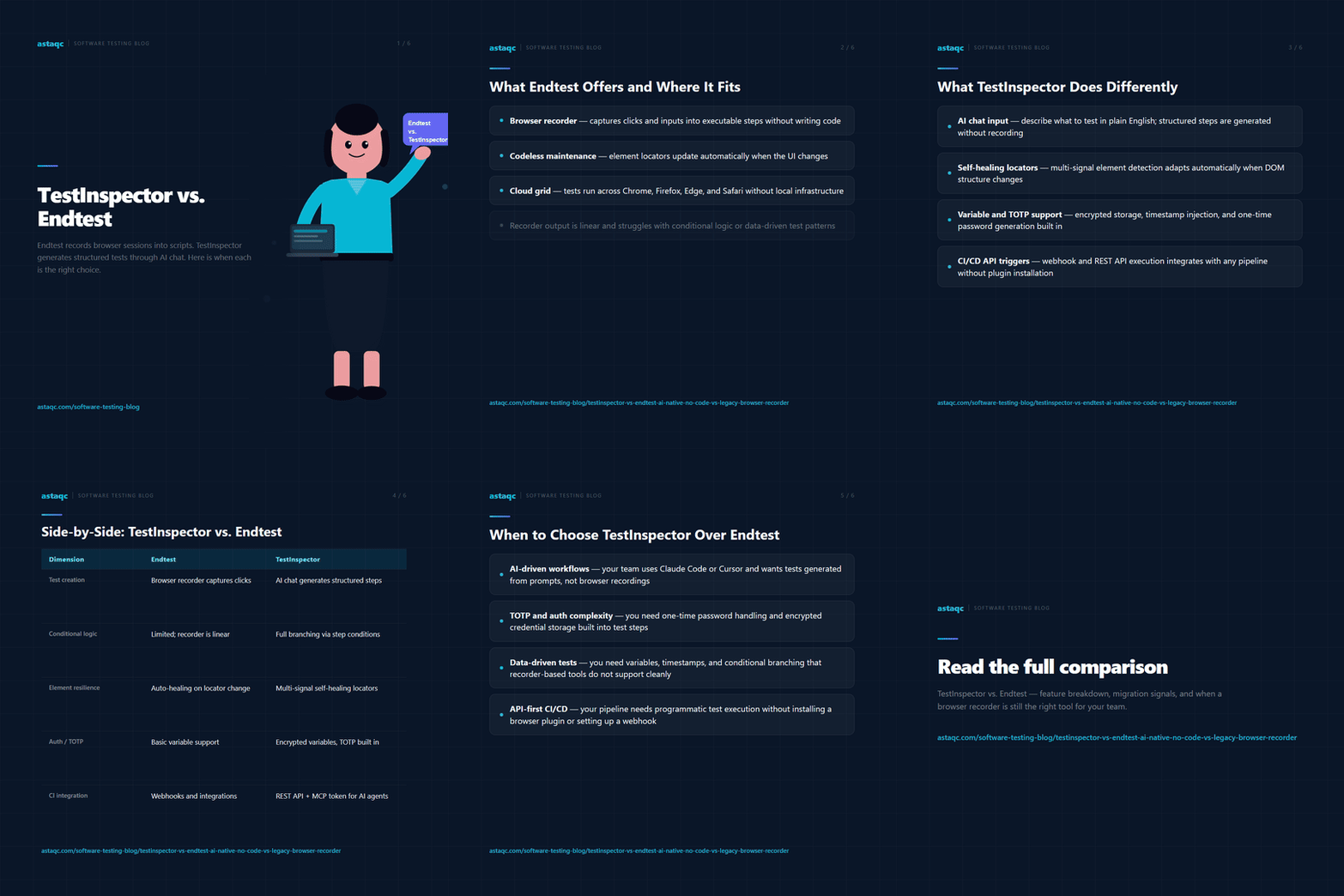
The table below compares both tools across the dimensions that matter most for teams evaluating no-code browser automation in 2026.
| Dimension | TestInspector | Endtest |
|---|---|---|
| Test creation model | AI chat interface generates structured test steps from natural language descriptions | Chrome extension recorder captures browser interactions; manual step assembly also available |
| Maintenance model | Self-healing: AI analyzes broken selectors and proposes corrections automatically | Manual: broken selectors require manual inspection and correction after UI changes |
| Browser support | Chrome, Firefox, Edge, Safari via Selenium | Chrome, Firefox, Edge, Safari; mobile web via Sauce Labs integration |
| Visual regression | SSIM screenshot comparison with baseline approval, crop regions, exclusion selectors | Screenshot capture per step for debugging; no baseline comparison visual regression |
| Accessibility testing | axe-core assertions with WCAG severity levels, inline with functional test steps | Not natively supported; requires separate accessibility scanning tool |
| API testing | HTTP request steps (GET/POST/PUT/PATCH/DELETE) with status and body assertions | Basic API step type available within browser test flows |
| CI/CD integration | CI/CD trigger API; webhook-based run initiation from pipeline events | REST API for test triggering; native integrations with GitHub, Jenkins |
| AI/MCP integration | MCP tokens for Claude Code, Cursor, Claude Desktop; AI test generation in coding environments | No MCP integration; no AI test generation from coding environments |
| Export options | Playwright TypeScript, Selenium IDE (.side), Gherkin (.feature) | Limited export; primarily platform-native format |
| Test scheduling | Cron, interval, and one-time scheduling with live WebSocket run streaming | Scheduled runs with email and webhook notifications |
TestInspector is the stronger choice when test maintenance cost is the primary concern. Recorder-based tools like Endtest generate tests quickly from existing manual workflows, but the recorded selectors break whenever the application UI changes. For teams whose applications change frequently — weekly or more — the time spent updating broken selectors in Endtest can exceed the time the tool saves compared to manual testing. TestInspector’s self-healing approach reduces this maintenance load by automatically identifying updated selectors when steps fail, keeping test suites functional without requiring a dedicated automation engineer to repair them after each release.
TestInspector is also the better choice when visual regression testing is part of the QA scope. Endtest captures screenshots per step for debugging purposes, but does not compare those screenshots against approved baselines to detect visual regressions. Teams that need to catch unintended layout changes, font rendering differences, or styling regressions need a tool with baseline comparison, which TestInspector provides through SSIM comparison with crop and exclusion support.
For teams whose scope includes accessibility compliance, TestInspector’s inline axe-core assertions allow WCAG issues to be caught in the same test run as functional assertions, without adding a separate accessibility scanning tool to the pipeline. Endtest does not include native accessibility testing, requiring an additional tool and a separate execution step.
Teams using AI coding tools — Claude Code, Cursor, or Claude Desktop — benefit from TestInspector’s MCP token integration, which allows test creation and management directly from the coding environment. This is relevant for engineering teams where developers contribute to test coverage alongside QA engineers. For teams where this integration matters, TestInspector’s MCP tokens make it the only no-code automation tool with a documented path for AI-assisted test generation from a coding environment. The manual vs. automated testing guide covers how to decide which test scenarios are best suited to no-code automation versus other approaches.
Endtest is a reasonable choice for teams whose primary need is a quick browser recorder that converts manual test sessions into repeatable automated scripts, and whose application UI is stable enough that selector drift is not a frequent problem. If the test suite is small, the application changes infrequently, and the team does not need visual regression or accessibility testing, Endtest’s recorder provides a lower-friction onramp than an AI-based test generation interface, which requires the user to describe tests in natural language rather than simply recording a browser session.
Endtest’s integration with Sauce Labs real device cloud is relevant for teams that need mobile web testing on real devices, which is a requirement for applications where mobile browser rendering differences matter. TestInspector’s cross-browser execution runs on Chrome, Firefox, Edge, and Safari without requiring a third-party real device cloud, but if real physical mobile device execution is a requirement, Endtest’s Sauce Labs integration covers that scenario. For teams evaluating which no-code tool is appropriate for their specific test scope, Astaqc’s hire QA team service can provide an assessment based on the application type, change rate, and team capacity. The outsourcing QA guide explains how to engage external QA expertise for tool evaluation and automation setup without building a full in-house automation practice.
TestInspector includes a browser extension that records user interactions in the browser and converts them to structured test steps, similar to Endtest’s Chrome extension recorder. The distinction is in what happens after recording: Endtest produces a replay script of the recorded interactions, while TestInspector’s steps are AI-generated structured actions that include the intent of each interaction, making them easier for the self-healing system to match to the correct element when the UI changes. Both tools support recording as a starting point; the difference is in the maintenance model that follows.
TestInspector’s self-healing system runs when a test step fails to locate an element using its configured selector. The system analyzes the current DOM, identifies candidate elements that match the step’s intent based on attributes, text content, and position, and proposes updated selectors with confidence scores. The test does not automatically pass; it fails and flags the suggested correction, which the user approves or modifies. Endtest does not include a self-healing selector update mechanism, so broken steps require manual inspection and selector correction after each UI change that affects the recorded locators.
TestInspector runs tests on Chrome, Firefox, Edge, and Safari using Selenium, covering the same major browsers as Endtest. Endtest adds mobile web testing on real devices through its Sauce Labs integration, which TestInspector does not replicate through a real device cloud. For teams whose cross-browser requirements include real physical mobile devices, Endtest’s Sauce Labs integration covers that scenario; for teams whose cross-browser requirements are limited to desktop browsers, both tools cover the same set.
Both TestInspector and Endtest support CI/CD integration through REST APIs that trigger test runs from pipeline events. TestInspector uses a CI/CD trigger API that allows test suites to be invoked from GitHub Actions, Jenkins, GitLab CI, or any pipeline tool that supports HTTP requests. Endtest provides a similar API and includes documented integrations with GitHub and Jenkins. For teams that need test results as a deployment gate, both tools support webhook-based result notification that can block or proceed based on pass or fail outcomes. The AI in software testing guide covers how no-code test automation tools fit into modern CI/CD pipelines alongside traditional framework-based automation.
No-code browser automation tools like TestInspector and Endtest are best suited to end-to-end tests of user-visible workflows: login and authentication flows, checkout and payment flows, form submission and validation, dashboard navigation, and key user journeys that span multiple pages. These tools are less suited to unit tests (which belong at the code level), pure API contract tests (which are more efficiently written in code-based tools like Postman or pytest), and tests that require complex data setup or teardown that would be easier to express in a programming language. TestInspector’s HTTP request steps extend its coverage into basic API assertions, but for teams with deep API testing requirements, a dedicated API testing tool remains appropriate. For a broader view of how to structure test coverage across tools and layers, Astaqc test automation services can design a test strategy that allocates coverage appropriately across no-code automation, API testing, and unit testing. The complete software testing guide provides a framework for understanding how automation layers fit together in a full QA strategy.
Endtest records and replays what testers already do; TestInspector generates and maintains tests through AI, reducing the locator-drift maintenance that makes recorder-based automation expensive to sustain as applications change.
August 28, 2026


Sign up to receive and connect to our newsletter

We founded ASTAQC as a tight-knit group of professional Software Testers and software developers.
Subscribe to our Newsletter