September 13, 2026
TestInspector and Accelq are both no-code or low-code test automation platforms, but they use fundamentally different architectures. Accelq uses an AI layer that generates proprietary script code behind the scenes, requiring QA teams to work through Accelq’s abstracted execution engine when tests fail or selectors change. TestInspector generates tests as structured, human-readable steps—not code—and runs them directly via Selenium on Chrome, Firefox, Edge, and Safari, keeping the full execution path auditable without proprietary intermediaries. Teams evaluating both platforms most often switch to TestInspector when the script layer in Accelq creates friction during debugging or when they want test results that can be reviewed without platform-specific knowledge.
The distinction matters most during test maintenance. When a UI change breaks an existing test, both tools detect the failure, but the path to resolution differs. In Accelq, the AI regen process updates the underlying script that QA engineers may not be able to read directly. In TestInspector, the self-healing mechanism flags the broken selector, proposes AI-suggested replacement selectors, and waits for human confirmation before updating the step—giving engineers full visibility into what changed and why. That transparency is what most engineering managers cite when explaining the switch. Astaqc’s test automation consulting services help teams evaluate which architecture suits their debugging and audit requirements.
Accelq positions itself as a no-code AI platform, but its core mechanism involves generating and managing Groovy-based scripts that run through its proprietary engine. When a QA engineer builds a test in Accelq’s visual interface, the platform generates underlying automation code that the engine executes. The AI assistance in Accelq is primarily used to generate these scripts from natural language inputs and to update them when UI changes are detected through its self-healing feature.
The platform covers web, mobile, and API testing within a single interface and includes test management features that track test cases, execution results, and defect linkages. Accelq also provides integrations with Jira, Jenkins, Azure DevOps, and similar CI/CD tools through its plugin ecosystem.
Where Accelq teams encounter friction is in the maintenance loop. When the AI-generated script drifts from the application state, the error message surfaces in terms of the script layer—line numbers, assertion failures in generated code—rather than in terms of the original step the QA engineer wrote. Engineers without scripting background need to rely on Accelq support or rerun the AI generation process, which does not always produce the same test structure. This creates a dependency on the platform’s AI regeneration rather than on the engineer’s own understanding of the test logic.
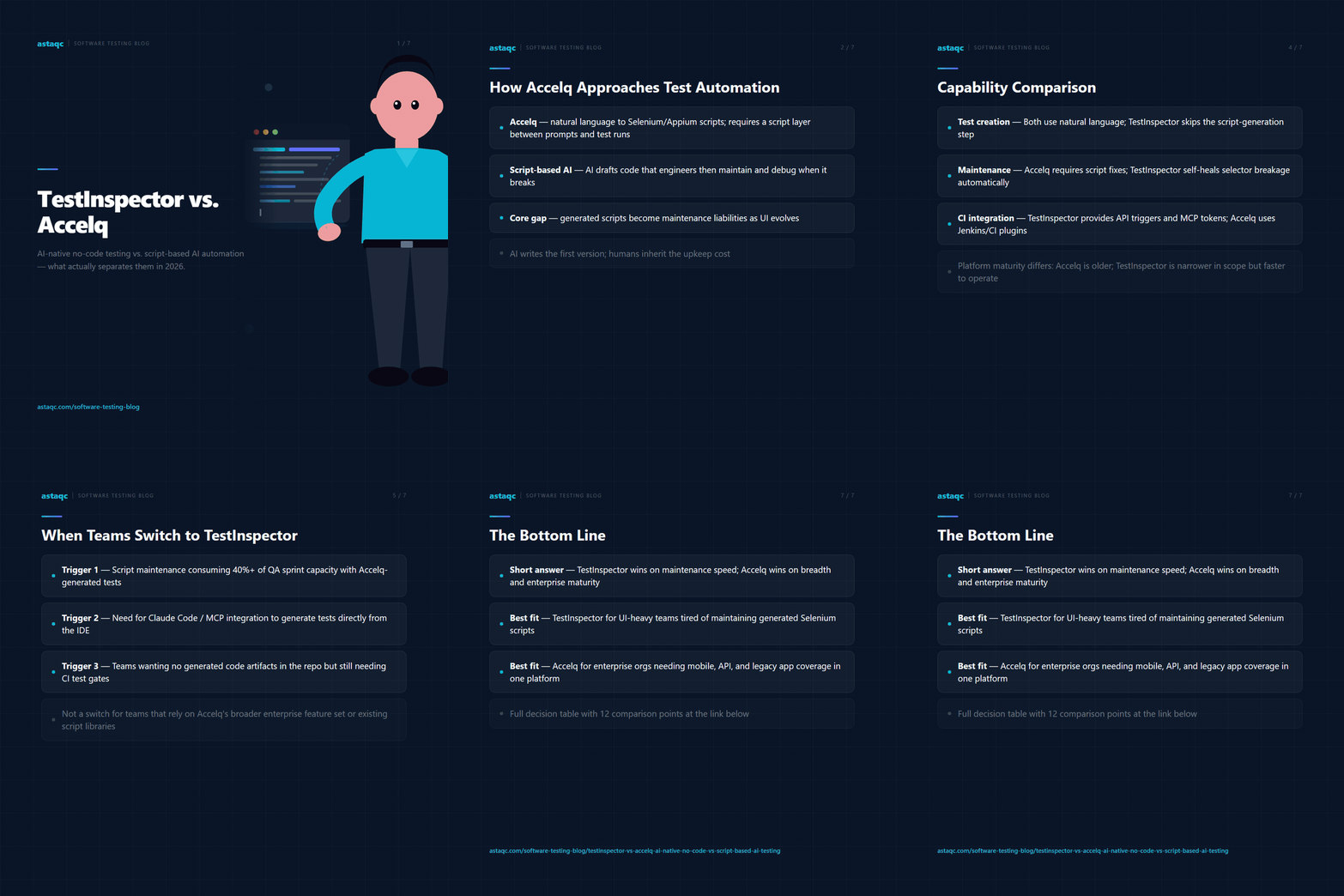
TestInspector generates tests as structured step sequences—not code. When a QA engineer describes a test scenario in the AI chat interface, the platform outputs steps with explicit actions (click, type, assert, navigate), target selectors, and expected values. Those steps are stored as structured data, not compiled scripts, which means a QA engineer can read, edit, and debug any test without knowing a programming language.
Execution runs via Selenium on the engineer’s choice of Chrome, Firefox, Edge, or Safari. The execution engine is standard Selenium—not a proprietary runtime—so the behavior in TestInspector matches the behavior you would see in any standard Selenium run. Live WebSocket streaming makes execution state visible in real time: engineers watch steps execute, see assertion results as they happen, and can intervene if a run goes wrong.
When a selector breaks during execution, TestInspector’s self-healing mechanism runs an AI-powered selector search to find the element by alternative attributes, text content, or nearby DOM context. It presents the suggested replacement to the engineer with a confirmation prompt before applying the change. The original selector is logged alongside the replacement, giving a clear audit trail of what changed during the maintenance cycle.
Variable management uses explicit named variables with {{VAR}}, {{TIMESTAMP}}, and {{TOTP:secret}} interpolation syntax, with a hierarchy of test-level, suite-level, and organization-level variables that inherit predictably. Sensitive values are encrypted at the suite and organization level. This explicit variable model—visible in every step that uses it—is easier to audit than the variable management embedded in a proprietary script layer.
The comparison below covers the dimensions that matter most during a QA tool evaluation. Teams should weight these based on their specific context—a team with QA engineers who have scripting backgrounds will make different trade-offs than a team running tests without development resources.
| Dimension | TestInspector | Accelq |
|---|---|---|
| Test representation | Structured steps (no code) | AI-generated Groovy scripts |
| Execution engine | Standard Selenium (Chrome, Firefox, Edge, Safari) | Proprietary engine |
| Self-healing | AI selector suggestion with human confirmation | Script regeneration (automatic) |
| Test debuggability | Step-level error with selector replacement log | Script-level error message |
| Variable management | Explicit named variables, hierarchy, encrypted storage | Parameter sets in the script layer |
| API testing | HTTP request steps (GET/POST/PUT/PATCH/DELETE) with assertions | API test module (separate interface) |
| Accessibility testing | axe-core assertions within standard test steps | Not a core feature |
| CI/CD trigger | REST API trigger with JSON result payload | Plugins for Jenkins, Azure DevOps, GitLab |
| AI coding tool integration | MCP tokens for Claude Code, Cursor, Claude Desktop | No MCP support |
| Test exports | Playwright TypeScript, Selenium IDE, Gherkin | Accelq proprietary format |
The most significant architectural difference is in test exports. TestInspector can export any test to Playwright TypeScript or Gherkin, which means teams retain ownership of their test logic independent of the platform. Accelq tests live in the Accelq format—migrating away requires rebuilding them. For teams evaluating long-term portability, this is often the deciding factor. Astaqc’s software testing services include platform migration assessments that quantify the cost of switching from one tool to another.
The pattern is consistent across teams that move from Accelq to TestInspector. The initial trigger is usually a maintenance problem: a major UI redesign or a framework upgrade causes a large number of Accelq tests to fail, and the regeneration process either does not produce the correct tests or requires significant manual correction. The team spends time on platform mechanics rather than on testing the application, and the value of the AI-generation promise does not hold at scale.
A second common trigger is audit requirements. Teams working in regulated industries—healthcare, fintech, insurance—need to demonstrate that test coverage is intentional and reviewable. A test that runs from a generated script that no engineer wrote is difficult to present in a compliance audit. A test that is a sequence of readable steps with named variables and assertion criteria is auditable by any stakeholder who understands the application, not just engineers familiar with the platform.
The third trigger is AI toolchain integration. Teams using Claude Code or Cursor for development want to generate tests from within their existing AI workflow, not from a separate SaaS platform. TestInspector’s MCP tokens allow AI coding tools to create and run tests directly, closing the loop between code generation and test generation. This integration does not exist in Accelq’s architecture. More detail on the tool is available at TestInspector.
Teams with strong scripting backgrounds and a preference for built-in test management—tracking test cases, linking them to requirements, and managing test plans—may find Accelq’s integrated test management layer more complete than TestInspector’s current approach. The right choice depends on whether the team’s primary bottleneck is test creation and maintenance friction or test governance and documentation. For guidance on choosing the right approach, see the manual vs. automated testing guide.
If your team currently has a large suite of Accelq tests, migration is not trivial. Accelq does not export to standard formats, which means each test needs to be recreated in TestInspector. The rebuild is faster than it sounds—TestInspector’s AI chat interface can regenerate a test from a written description in minutes, and the browser extension can record new versions of existing flows—but the calendar time for a full migration depends on suite size and complexity.
A parallel run approach is the safest path: run both suites for four to six weeks on the same deployment pipeline, compare pass/fail rates for identical scenarios, and confirm that TestInspector is catching the same failure classes. Then decommission Accelq after the confidence window closes. Astaqc’s QA team services include migration support for teams moving between test automation platforms.
TestInspector runs tests via Selenium on Chrome, Firefox, Edge, and Safari. Accelq also supports multi-browser execution through its proprietary engine. Both platforms cover the major browser targets for web application testing. Mobile browser testing in TestInspector is limited to mobile web via Selenium’s browser emulation modes.
TestInspector organizes tests into suites with a hierarchy of test, suite, and organization levels. Linking individual tests to external requirement IDs or defect tickets is handled through test descriptions and CI/CD integration metadata rather than a built-in test management module. Teams that need formal requirement traceability typically supplement TestInspector with a lightweight issue tracker rather than relying on in-platform test management.
Accelq does not provide a standard export format, so tests need to be rebuilt in TestInspector from the original test scenarios or user stories. The TestInspector browser extension can record new versions of existing flows, which significantly reduces the time for recreation. A test that took an hour to build in Accelq typically takes ten to fifteen minutes to recreate in TestInspector via recorded interaction plus AI step refinement.
Yes. The AI chat interface, browser extension recording, and structured step representation make TestInspector usable by developers who are not QA specialists. The MCP integration allows developers using Claude Code or Cursor to generate and run tests without leaving their coding environment. This is the primary reason some development-led teams choose TestInspector over alternatives that require QA-specific knowledge to operate.
TestInspector supports TOTP-based 2FA testing through the {{TOTP:secret}} variable, which generates a valid one-time password from a stored TOTP secret at runtime. This allows automated test runs to navigate 2FA login flows without manual intervention or third-party workarounds. The secret is stored encrypted at the suite or organization level and is not exposed in step logs.
For teams evaluating AI-native test automation, Astaqc offers testing documentation and platform assessments to help narrow the decision to the right tool for your team’s specific test coverage gaps and workflow constraints.
When a test breaks in TestInspector, the engineer sees exactly which step failed and which selector was proposed as a replacement. When a test breaks in a script-based platform, the engineer sees line numbers in generated code they may not have written.
September 13, 2026


Sign up to receive and connect to our newsletter

We founded ASTAQC as a tight-knit group of professional Software Testers and software developers.
Subscribe to our Newsletter



.png)